Feature catalog
Everything Chalk does, in one place.
Chalk is the open-source K-12 IT stack. It connects to your SIS, becomes your IDP, and pushes clean data into Google Workspace, AD, and downstream apps.
Start with Devices and Help desk — the modules districts come here for — then keep scrolling for the roster, identity, and provisioning layer they are built on. Everything on this page ships today.
Devices
Asset tracking that starts already populated
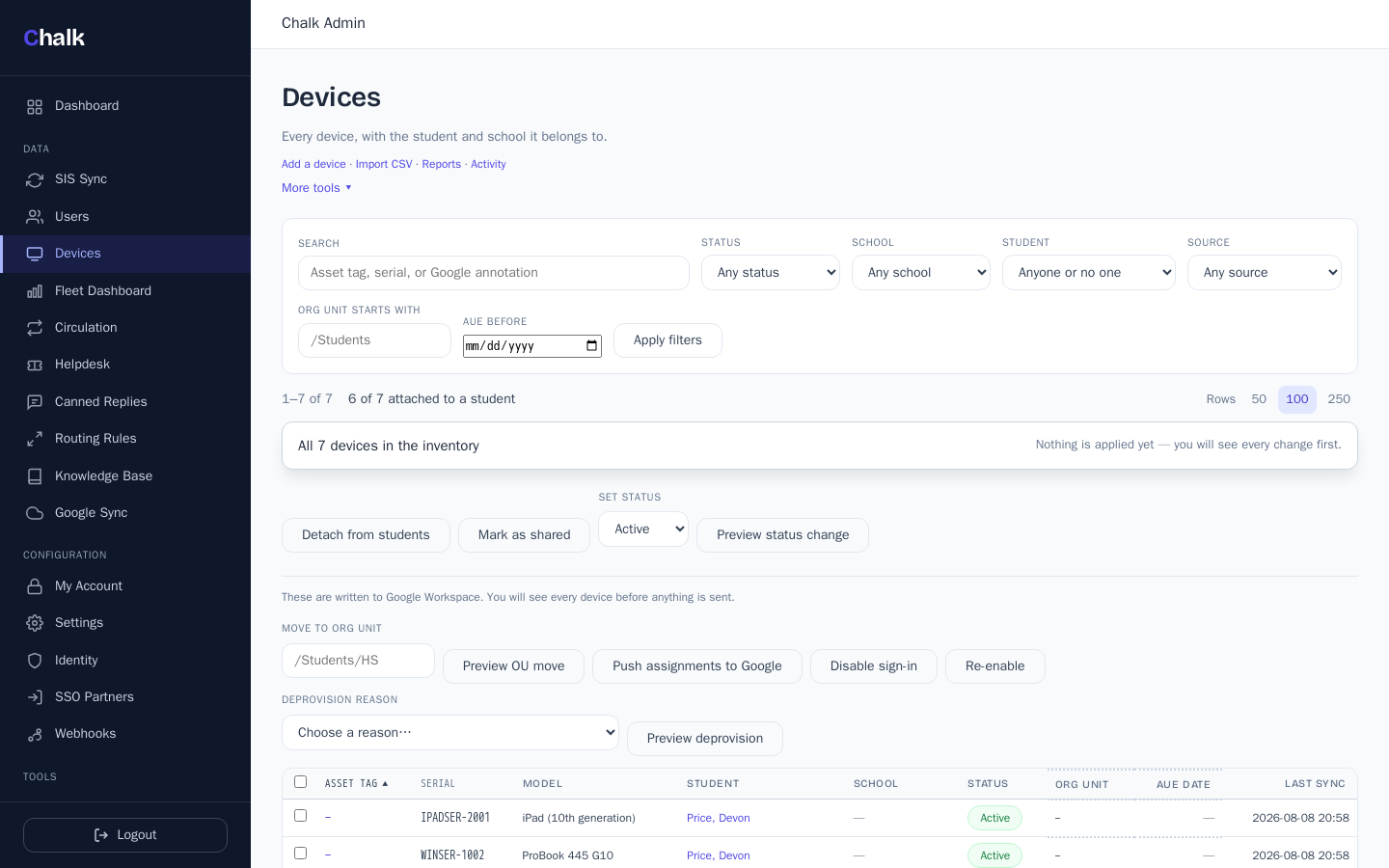
The device module reads your fleet from the consoles you already run — Google Admin for ChromeOS, Microsoft Intune for Windows, Jamf Pro for iPads — and attaches it to the roster Chalk already holds, so the owner column is never a stale CSV.
Mixed-fleet ingest
Pull every enrolled Chromebook from Google Admin — serial, model, org unit, status, auto-update expiration — plus Windows devices from Intune and iPads from Jamf Pro, into one inventory. (The Intune and Jamf connectors are new and validated against mocked APIs so far; field reports welcome.)
Devices attached to students
Each device is matched to a real roster user by email, so the inventory shows the student and their school beside the serial. Devices Chalk cannot place wait in an honest unmatched queue instead of guessing.
Preview before any write
Org-unit moves, disable/re-enable, deprovision, and pushing assignments back into Google's annotated fields are all planned as a reviewable diff first, then committed with a per-item record of what landed.
The 1:1 lifecycle, end to end
A circulation desk with due dates and agreements, repair records with costs, a fees ledger (assessment only — Chalk never touches payment cards), lost/stolen with police-report capture, and a loaner pool.
Barcode and QR, no special hardware
Scan a tag or serial to jump to a device, print QR label sheets for any filtered view, and reconcile a room against expected inventory with a scan-to-audit mode. All keyboard-wedge.
Scan with the phone in your hand
On Chrome and Android the scan and audit pages open the camera: point at a label, the code fills in and submits, and the viewfinder reopens for the next device. Add the console to a home screen and the circulation desk is one tap away. No app store, nothing to install on the device itself.
Purchase orders and funding sources
Record a PO with its vendor, date, and funding source, and see how many devices were received against it — receiving is the same CSV import preview the inventory already trusts. Funding sources are a managed list, so ESSER and Title reporting stops being a spelling contest.
Warranty, answered where it is asked
Coverage lives on the device card, appears on any help-desk ticket about the device ("Under warranty until…"), and the reports page groups the fleet by when coverage runs out — the repair-or-replace call at a glance.
Parts from the same stock
A repair pulls its parts from the same consumables inventory the give-out flow manages — quantities and costs roll onto the repair, availability updates everywhere, and crossing an item's low-stock threshold sends one alert email.
A fleet dashboard you can hand to the superintendent
Live numbers and a widget for every saved report, server-rendered. Mint a read-only share link that opens a standalone page — counts and labels only, never device rows or student names — and revoke it any time. The same numbers arrive as a daily email digest if you want them to.
All asset types on paid tiers
Laptops, iPads, projectors, hotspots, and carts alongside Chromebooks. The free hosted tier is limited to Chromebooks; breadth is what the paid tiers add.
Help desk
Tickets that already know who is asking
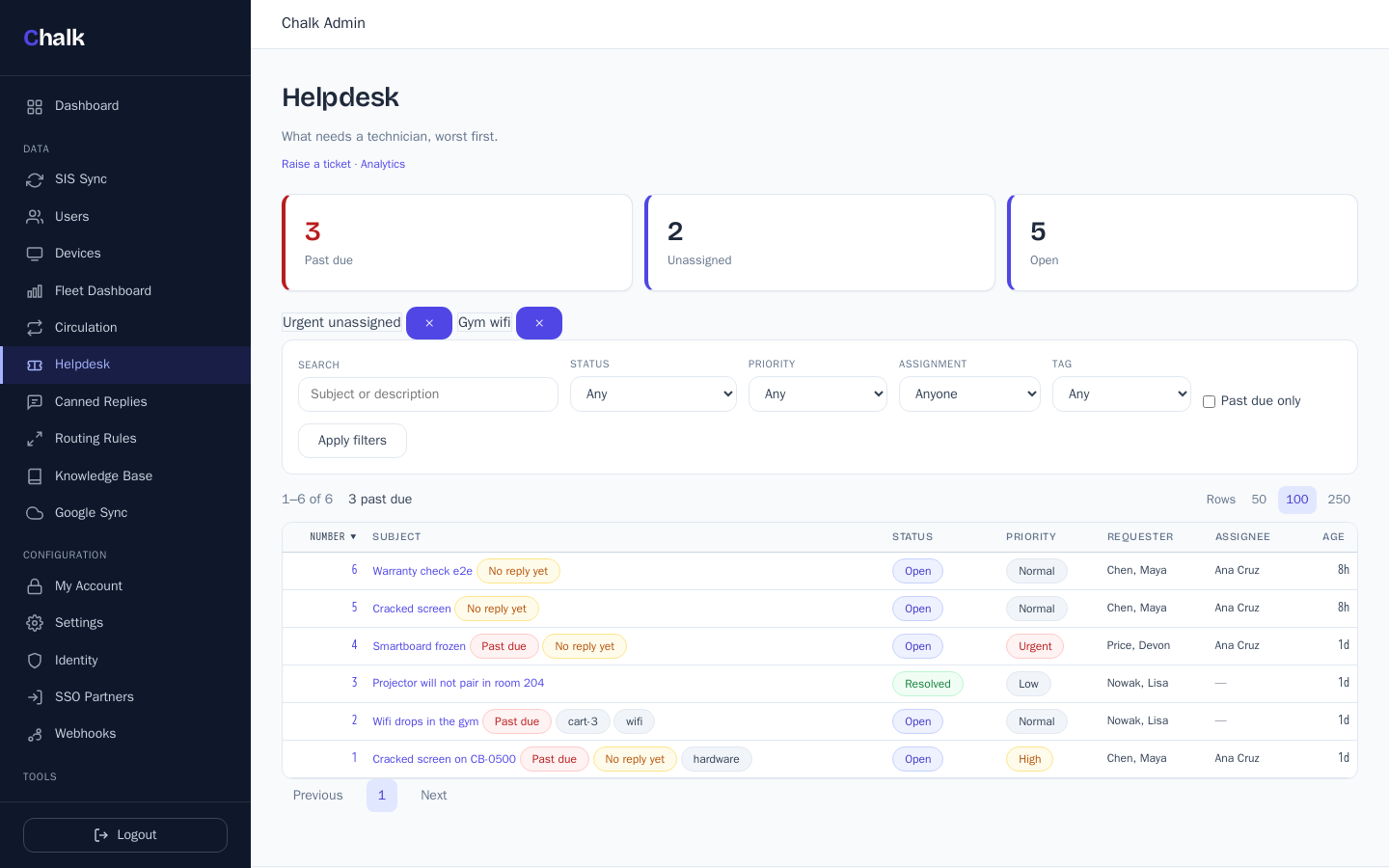
A ticketing system built on the same roster and the same inventory, so a ticket arrives with the person, the school, and the device already attached.
A real technician queue
Assignment, priorities, tags, saved views, canned responses, and routing rules that auto-assign along your SIS hierarchy instead of a hand-maintained group list.
SLAs that mean something
First-response and resolution deadlines that pause while you wait on the requester, and breach states you can see coming — not a report you read after the fact.
Email in, email out
Staff open tickets by email or through a portal with magic-link sign-in; replies and resolutions go back out by email, with a CSAT ask on close.
Tickets linked to devices
A ticket about a broken Chromebook carries the asset record with it, so repair history and assignment live in one place.
Knowledge base
Publish articles to a public help portal so the questions that answer themselves stop becoming tickets — plus analytics on volume, response times, and backlog.
Roster sync
Every major SIS, one canonical roster
OneRoster 1.1 push and pull against the four sources districts actually run. Chalk normalizes the messy bits so downstream systems see clean data.
PowerSchool
OAuth 2.0 client to the PowerSchool plugin endpoint. Full org, course, class, user, and enrollment sync.
Skyward
OneRoster 1.1 REST client tuned for Skyward's pagination and identifier quirks.
Infinite Campus
OAuth 2.0 + OneRoster 1.1 with handling for Campus-specific status codes.
OneRoster CSV
Drop any vendor's OneRoster CSV export into Chalk and treat it as a first-class source.
Quirk-handling, built in
Whitespace normalization, missing-identifier recovery, and `tobedeleted` status handled the way the spec actually says.
Push and pull
Use Chalk as a OneRoster consumer for your SIS, or as a OneRoster producer for downstream apps. Same data model either way.
SSO & Identity
Be your own identity provider
A full self-hosted IDP with the auth methods K-12 actually needs — from staff SAML to QR badges for kindergartners.
SAML 2.0 IDP
Auto-generated self-signed keypairs, metadata endpoint, and signed assertions. Drop SAML SPs into the console.
OIDC federation
Federate with upstream IdPs (Google, Microsoft, district SSO) or expose Chalk as an OIDC provider.
Password + Argon2
Argon2id password hashing for admin and staff accounts. Sensible defaults, configurable parameters.
QR badge login
Visual login for K-2 students. Admins generate, revoke, and audit badges from the console.
Picture password
Image-sequence login as an alternative for early-grade students who can't yet type.
Sessions & audit
Server-side sessions, configurable timeouts, and a complete audit log of every authentication event.
Data portability
Get your roster data in, and back out
Roster data you already have is importable, and the roster Chalk holds is exportable. Nothing here is locked to Chalk's data model.
Import an existing export directory
Point `chalk migrate --from clever|classlink --path <dir>` at an unzipped export directory and Chalk reads the OneRoster CSVs inside it into its own data model. Run it with `--dry-run` first.
OAuth 2.0 compatibility endpoints
Chalk serves OAuth 2.0 authorization and user-info endpoints shaped like Clever's and ClassLink's. Whether a given downstream app works against them depends on that app — test yours before you cut over.
OneRoster CSV export
`chalk export` writes a standard OneRoster CSV bundle with a manifest, so your roster is portable to anything that reads the spec.
Provisioning
Push the roster into Google and AD
Workspace, on-prem AD, and Entra ID all provision from the same canonical roster.
Google Workspace users
Create, update, and suspend users via the Admin SDK with domain-wide delegation.
Google OUs from SIS hierarchy
Org units derived automatically from your SIS school and grade structure.
Classrooms & groups
Provision Google Classroom rosters and Google Groups from OneRoster class enrollments.
Active Directory / LDAP
User provisioning, OU mapping, and group membership against on-prem AD via LDAP — with run history, per-user state, and a manual trigger in the console.
Entra ID (Azure AD)
Roster-driven provisioning over the Microsoft Graph API: accounts created under your domain, renames patched, departures disabled — never deleted. New, and validated against a mocked Graph API so far.
Dry-run previews
See exactly what will change before any write hits production. Diff users, OUs, and group membership.
Scheduled cron sync
Per-tenant scheduler with full run history. Auto-suspend inactive users on a cadence you control.
Developer & integration
Chalk as your district's roster API
Once Chalk has the roster, every downstream app can consume it the same way — REST, webhooks, or CSV.
OneRoster 1.1 REST API
Read-only endpoints at /api/oneroster/v1p1/. Standards-compliant, no proprietary shape.
HMAC-signed webhooks
HMAC-SHA256 signed payloads with exponential backoff retry. Verify and trust at the edge.
CSV export with manifest
OneRoster CSV bundles with manifest.csv for downstream tools that expect file-based ingest.
Admin console
Server-rendered, no SPA bloat
Axum + Askama + HTMX. Fast to load, fast to operate, no JavaScript framework churn.
Dashboard
At-a-glance tenant health: last sync, user counts, recent audit events.
Sync management
Trigger, schedule, and inspect SIS, Google, and AD syncs from one screen.
Users directory
Search, filter, and inspect every provisioned user with their identity sources.
Identity & SSO config
Configure SAML SPs, OIDC clients, and password policy. Manage SSO partners.
Webhooks & API tokens
Register webhook endpoints, inspect delivery attempts, and mint or revoke OneRoster API bearer tokens.
Audit log
Every admin action, every authentication, every sync run — queryable and exportable.
Permissions that fit real districts
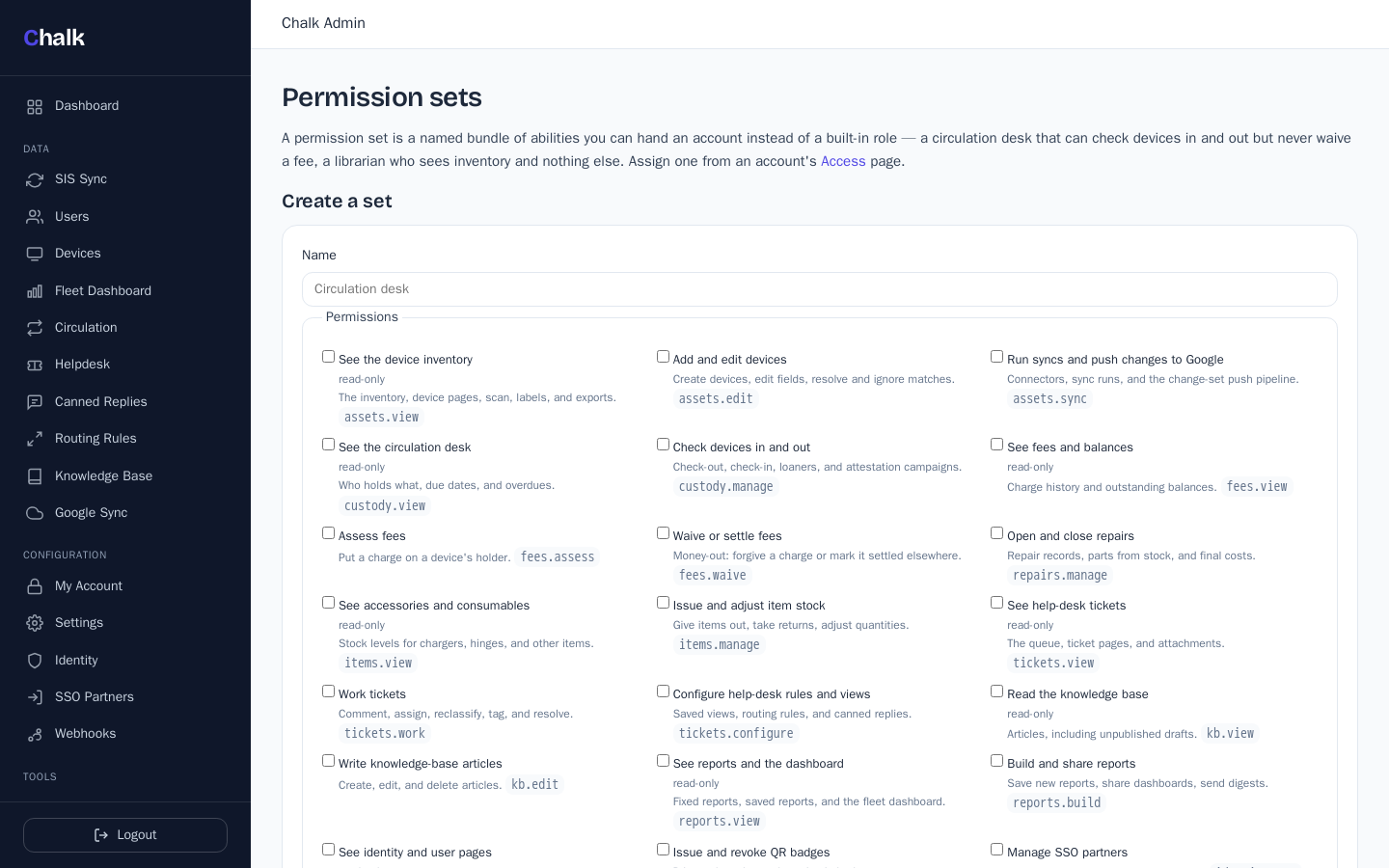
Admin, technician, and read-only work out of the box, or compose a custom permission set — a circulation desk that can check devices in and out but never waive a fee. Changes apply on the account's next request, not its next login.
Building-level access
Limit any account to particular schools: their inventory, ticket queue, exports, and reports show those schools' rows only — enforced in the database query, not hidden in the page — and another school's device reads as not-found even by direct URL.
Two-factor sign-in
TOTP enrollment with recovery codes for any console account, and single sign-on into the console through Chalk's own IdP — the product dogfoods its own identity stack.
SSO landing page
Self-hosted launchpad for your apps
Every tenant gets a launch portal at /portal: students and staff sign in once and see tiles for the apps they are entitled to.
Role-aware tiles
Each SSO partner declares which roles see it, so students, teachers, and admins get different launchpads from one configuration.
Audience scoping
Narrow a tile to specific schools, classes, or grade levels — a high-school-only app never appears on a second-grader's portal.
One session, every app
The portal runs on the Chalk IDP session, so launching a tile is a SAML or OIDC handoff rather than a second login.
Security & operations
Built for district IT review
Encryption, isolation, and audit logging that hold up to a security questionnaire.
AES-256-GCM at rest
SAML keypairs and other tenant secrets sealed at rest with authenticated encryption.
Master key rotation
Rotate the master key without taking the platform offline.
Audit logging
Every admin and authentication action logged with actor, target, and timestamp.
CSRF & security headers
CSRF tokens on every state-changing request, plus HSTS, CSP, X-Frame-Options, X-Content-Type-Options, and Referrer-Policy on the hosted service.
Per-tenant Postgres isolation
Multi-tenant deployments use per-schema isolation — one tenant cannot read another's data.
Read the full posture
Threat model, key handling, and rotation procedures documented on the security page.
Deployment
Self-host or let us run it
Same product either way. SQLite for single-tenant self-host, Postgres for multi-tenant cloud.
SQLite embedded
Default for self-host. Zero external dependencies — one binary, one database file.
PostgreSQL multi-tenant
Per-tenant schema isolation, per-tenant connection pool, per-tenant scheduler.
CLI commands
init, sync, status, serve, devices, mdm, import, export, migrate, google-sync, ad-sync, entra-sync, console-users, jobs, webhook, passwords, update.
Try it on your district's roster.
Let us host it — priced by fleet size, no per-seat fees, no per-student fees — or run the whole feature set yourself, free forever under AGPL-3.0.